

Solvait MCP Server: Agentic AI for HR, Connected to Your Platform
The Solvait MCP Server is a connection layer built on the Model Context Protocol that lets any AI assistant, whether Claude, Cursor, or your organization's own agent, execute real HR actions inside the Solvait HCM : book leave, pull a payslip, approve a pending request, all from a plain written message.
An employee types "book me 3 days of annual leave next week." The server converts that into a validated tool call, runs it in the HR system, and returns the confirmation to the same chat. No portal to open, no form to fill, and no access token ever passes through the AI layer.
This article covers three things: how you connect your AI model to Solvait's systems step by step, why the server was designed specifically for HR teams, and what your whole organization gains from this kind of connection.
How Do You Connect Your AI Model to Solvait's Systems?
The Model Context Protocol is an open standard Anthropic released in November 2024 to standardize how AI assistants talk to external systems. OpenAI, Google, and Microsoft adopted it soon after, and its governance moved to the Linux Foundation at the end of 2025, which made it the industry's de facto standard. Any client that speaks the protocol can connect to the Solvait MCP Server out of the box: Claude Desktop, Cursor, MCP Inspector, or an AI Agentic you've built in house.
Every request travels the same three deterministic steps:
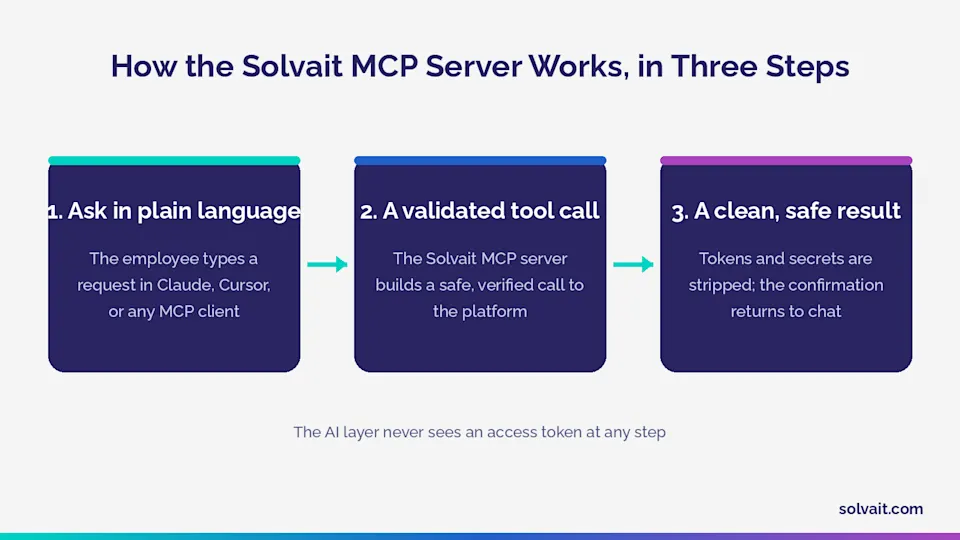
Ask in plain language :
The employee types the request in any MCP client the way they'd message a colleague: "what's my leave balance?" or "approve Ahmed's request."
A validated tool call :
The server maps the request to a structured tool and builds a safe, verified call to the Solvait platform. The model doesn't guess endpoints or write queries; it invokes a predefined tool with typed inputs.
A clean, AI safe result :
Tokens and internal system noise get stripped from the response, and the confirmation lands back in the chat: "Done. April 14 to 16 booked. 12 days remaining."
On identity and permissions, the server offers three connection modes so you can match your governance model:
A dedicated service account
from Solvait, the default for secure server-to-server access.
Routing through the Solvait gateway
with the same identity, for teams that want one central point of control.
Per user sign in
, where every employee operates under their own permissions with no shared secret anywhere.
That third mode settles the question every IT director asks first: what does the assistant actually see of our data? Here the answer is simple. It sees exactly what that employee would see in the system, and nothing more.
Three Reasons HR Teams Are Adopting It
1. It integrates with any MCP client, no custom build required
Every traditional integration between an HR system and an outside tool used to mean a standalone software project: APIs, maintenance, version alignment. An open standard flips that equation. One integration opens an entire ecosystem of current and future clients. Anthropic reports over 97 million monthly downloads of the protocol's Python and TypeScript SDKs, which gives you a sense of the ecosystem your platform joins the moment you connect.
2. More than 40 HR actions, ready as AI tools
The server doesn't just read data. It acts. Every core Solvait capability becomes a structured tool the assistant can invoke directly, across eight areas:
Viewing and updating employee profiles and documents. Leave balances, annual leave requests, and attendance logging. Payslips, disbursement requests, and loan management. Pending approvals with approve, reject, or delegate. Overtime and remote work requests. HR letters and expense claims with attachments. Travel requests and education entitlements. Announcements and HR notifications.
The practical difference shows up fastest in a side by side view:
Task | Through the traditional portal | Through the Solvait MCP Server |
Book annual leave | Log in, navigate screens, fill a form, wait | One chat message, instant confirmation with remaining balance |
Approve team requests | Open the portal for each request separately | Pending approvals appear in chat: approve, reject, or delegate |
Pull a payslip | Search the archive, download manually | Retrieved instantly, stripped of any sensitive data |
Salary certificate letter | Formal request, follow up by email | One text request opens the ticket with the right attachments |
3. Secure by design, not by configuration
Security here isn't a toggle you remember to switch on later. It's the default state. The AI layer never receives an access token; credentials stay inside the server. Internal system data and anything resembling a secret are stripped from every response before the model sees it, and structured logs automatically redact tokens, passwords, and API keys. Add automatic token refresh, retry with backoff, and internal rate limiting, and you get an enterprise grade layer fit for payroll and employee data. Worth adding: Solvait is ISO 27001:2022 certified, so the governance is documented practice, not a marketing promise.
The Benefits Across Your Organization
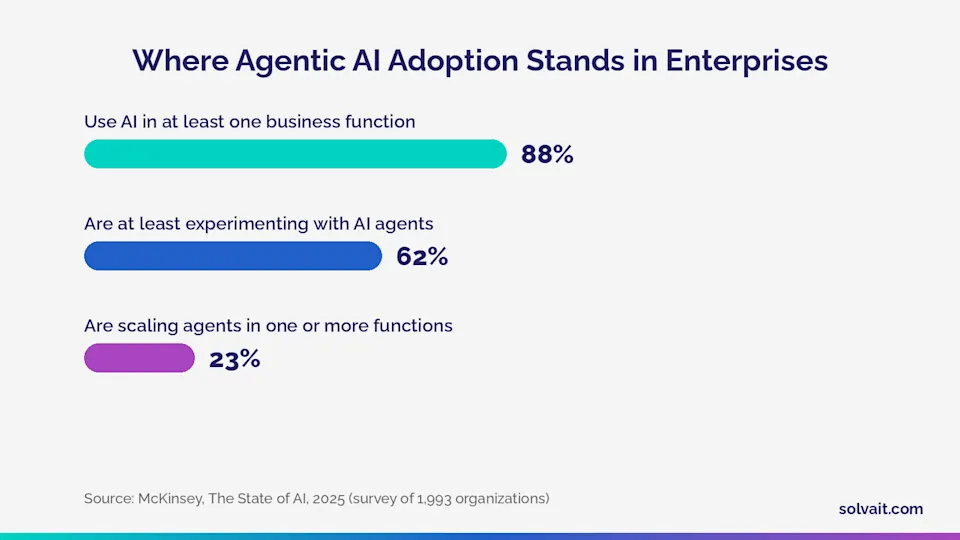
The global numbers confirm this shift is past the experiment stage. McKinsey's State of AI survey, published in November 2025 across 1,993 organizations, found 88% now use AI in at least one business function, 62% are at least experimenting with AI agents, and 23% have reached the point of scaling them.
Microsoft's 2025 Work Trend Index, built on a survey of 31,000 workers in 31 countries, goes further: 81% of leaders expect agents to be moderately or extensively integrated into their company's AI strategy within 12 to 18 months, and 46% say they already use agents to fully automate workstreams.
So what does that mean for an HR team specifically? Three concrete gains:
Your team's time comes back : Deloitte's research puts the share of HR time spent on repetitive administrative work at up to 57%. Every leave request that flows through chat instead of the portal, every payslip employees pull themselves, is minutes returned to the work that genuinely needs humans: workforce planning, talent development, and the complicated cases.
An employee experience that feels like 2026, not 2016 : Your people use AI assistants in their daily lives, then hit an internal portal from another era. One Solvait customer put it in a single line: "Within one month, HR portal visits dropped by half. Our employees just ask, and the assistant gets it done." That's employee self service in its honest sense.
Alignment with where Saudi Arabia is heading : The Saudi government declared 2026 the Year of Artificial Intelligence, and SDAIA's latest report tracked more than 100 AI tools deployed across 12 professional fields, HR among them, cutting 60% to 70% of the time spent on repetitive tasks. Saudi organizations connecting their systems to AI agents today aren't running an experiment. They're keeping pace with national policy.
And let's be honest about the flip side: the connection alone doesn't create value. An organization with stale employee data or chaotic approval chains will simply get chaos, faster. Agentic AI multiplies the quality of your existing processes, good and bad alike.
Common Mistakes When Connecting AI to HR Systems
We've watched teams get excited about the idea and then stumble in execution, usually for one of three reasons:
Giving the model direct access to the database or raw APIs. This is the most dangerous shortcut available. A language model holding a broadly scoped access token is a security incident waiting for its date. The separation an MCP server enforces between the intelligence layer and the data layer isn't architectural luxury; it's a safety requirement.
Starting with the complex use cases. Don't begin by restructuring payroll through chat. Start with high-frequency, low-risk queries and requests: balances, payslips, letters. Earn employee trust first, then expand.
Skipping per-user permission scoping. If everyone operates through one broadly scoped service account, you've thrown away the design's best feature. Per user sign in exists for a reason. Use it.
Where Do You Start?
If your organization already runs on the Solvait HCM platform built on Microsoft Dynamics 365, the MCP server connects your existing investment to the generation of AI assistants without replacing anything. And if you're evaluating a new HR system, make agentic AI readiness one of your selection criteria. You'll find the full server details on the Solvait MCP page.
The most honest way to evaluate the idea is to see it working on your own data and scenarios, in a 30-minute walkthrough our team runs in a fully isolated environment per organization.
Book a demo of the Solvait MCP Server
FAQ
What is the Solvait MCP Server?
It's a server built on the Model Context Protocol that connects any protocol-compatible AI assistant to the Solvait human capital management platform. It turns more than 40 HR actions, from leave to payroll to approvals, into structured tools the assistant can safely invoke and actually execute in the system.
Does the AI assistant see passwords or access tokens?
No. The AI layer never receives an access token; credentials stay inside the server. Internal system data and anything resembling a secret are stripped from every response, and tokens, passwords, and API keys are automatically redacted from logs before they're stored.
Which assistants and clients work with the Solvait MCP Server?
Any client that supports the Model Context Protocol works out of the box. The best known examples are Claude Desktop, Cursor, and MCP Inspector, plus custom agents your organization builds in house on the same protocol, with no per client integration work.
Can every employee execute any action through the assistant?
No. Permissions follow identity. In per user sign in mode, each employee operates under their normal system permissions, so they can only see and do what their roles allow, exactly as if they'd logged into the portal themselves. Service account and central gateway modes are also available for enterprise scenarios.
Does enabling the server require a long technical project?
It doesn't require replacing systems or building custom integrations, because it runs on top of your existing Solvait platform through a ready open standard. Setup centers on choosing the right identity mode and scoping permissions, and you can start with a limited tool set and expand gradually as your organization is ready.
References
McKinsey & Company — The State of AI in 2025: Agents, innovation, and transformation, 2025 (the 88%, 62%, and 23% AI and agent adoption figures)
Microsoft — Work Trend Index 2025: The Year the Frontier Firm Is Born, 2025 (81% of leaders expecting agent integration within 12 to 18 months)
Microsoft — The 2025 Annual Work Trend Index announcement, 2025 (46% of leaders using agents to fully automate workstreams)
SDAIA, as covered by Al Riyadh newspaper, 2026 (100+ AI tools across 12 professional fields, cutting 60% to 70% of time on repetitive tasks)
Anthropic — Introducing the Model Context Protocol, 2024 (the protocol's launch as an open standard)
Anthropic — Donating the Model Context Protocol to the Agentic AI Foundation, 2025 (governance move to the Linux Foundation and 97M+ monthly SDK downloads)
Ready to see Solvait in action?
Book a personalized demo and see how Solvait's AI-powered HR platform can transform the way your team works.
Tags
Related Posts

AI Recruitment in Saudi Arabia
How does Agentic AI speed up hiring in Saudi Arabia? CV screening, one skills based match score, and a decision that stays with your team. Meet Solvait Attract.
Jun 8, 2026

Inside Tashghil: The Operations Agent for HR Automation
Tashghil, Solvait's operations agent, runs leave, advance automatically within guardrails, while your team keeps the call. Here's how.
Sep 22, 2026
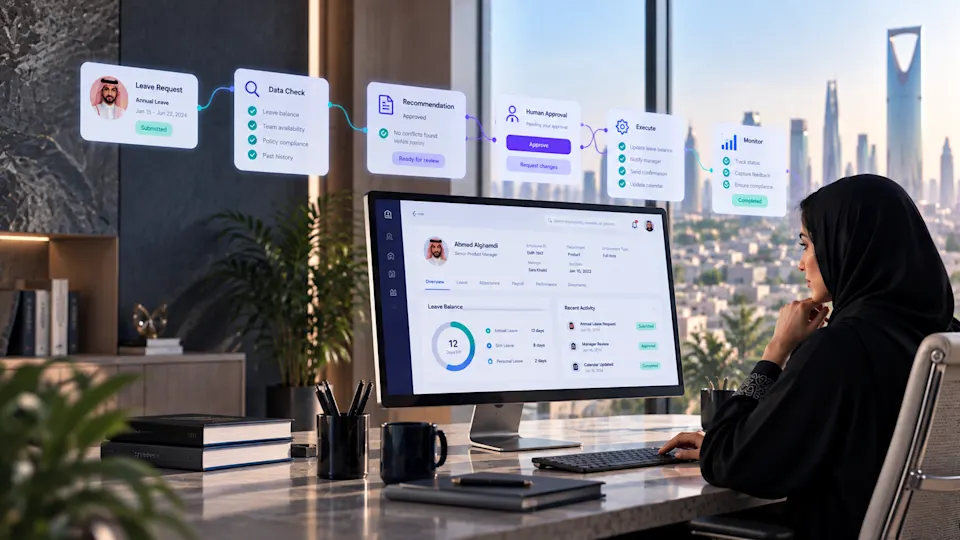
Agentic AI in HR: What "Self Running HR" Really Means
Agentic AI in HR means AI agents execute HR work under human oversight. Here is what that changes for Saudi HR teams, and what it does not.
Sep 16, 2026