
Solvait Sign · Electronic signature

    The signature step,finally inside HR.

    Send, sign and file offer letters, payroll approvals, policies and internal documents without leaving Solvait. In English and Arabic.
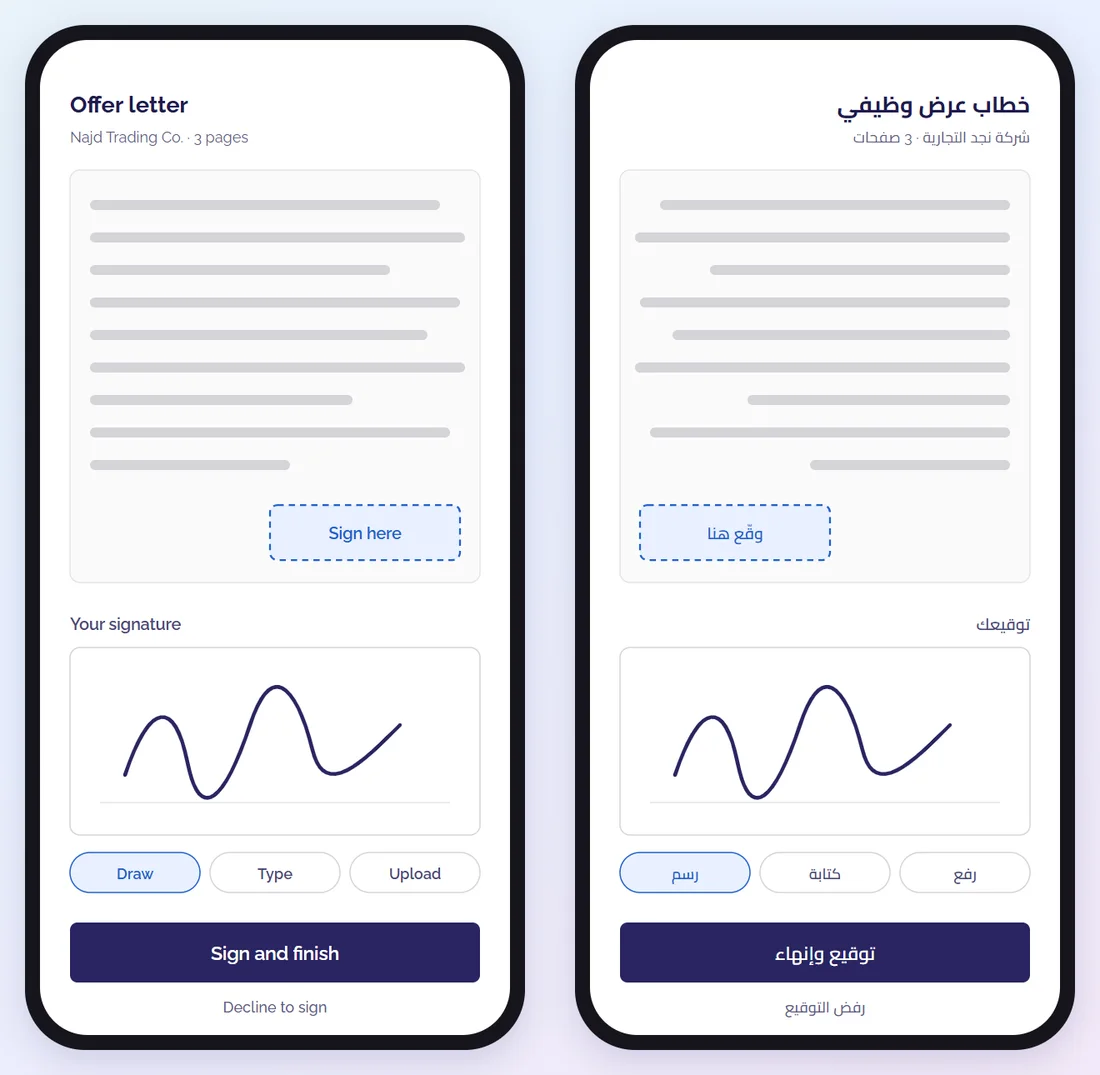
    English and ArabicNo account, no app to installSigned PDF with audit trail
    Two phones showing an offer letter and a signature pad, one in English and one in Arabic.

    Product illustration

    The problem

    A signature should take a minute.

    In most companies it takes a printer, a scanner, three reminders and a search through email for the signed copy. Or a second tool nobody asked for.

    What Sign replaces
    • Printing, signing, scanning and emailing
    • Chasing people on WhatsApp for a signature
    • A separate signing tool, with every name and email typed in again
    • Searching inboxes for the signed copy
    How it works

    Three steps. Nothing to print.

    01
    Send
    From the employee's or candidate's page, or from Sign Center. Pick who signs and in what order.
    02
    Sign
    On the phone, in the Solvait app or portal, or from a link. In English or Arabic.
    03
    Filed
    The signed copy is locked, certified and stored in the right folder.
    Why Solvait Sign

    Signatures, inside the system your people already use.

    Built in, not bolted on.
    Sign lives inside AI HR, PeopleHub, Attract and Wise. Same login, same look, same employee records. Nothing to import and nothing to keep in sync.
    Easy for the person signing.
    No account to create and no app to install. Open, read, sign, done, in English or Arabic.
    A record you can stand behind.
    Every signed document is locked and carries a certificate: who signed, when, how they were identified, and each step in between.
    See it

    From “please sign” to signed, in minutes.

    Product illustrations of Solvait Sign. Company and employee names are invented.

    01
    Send for signature

    Send from where the document already is.

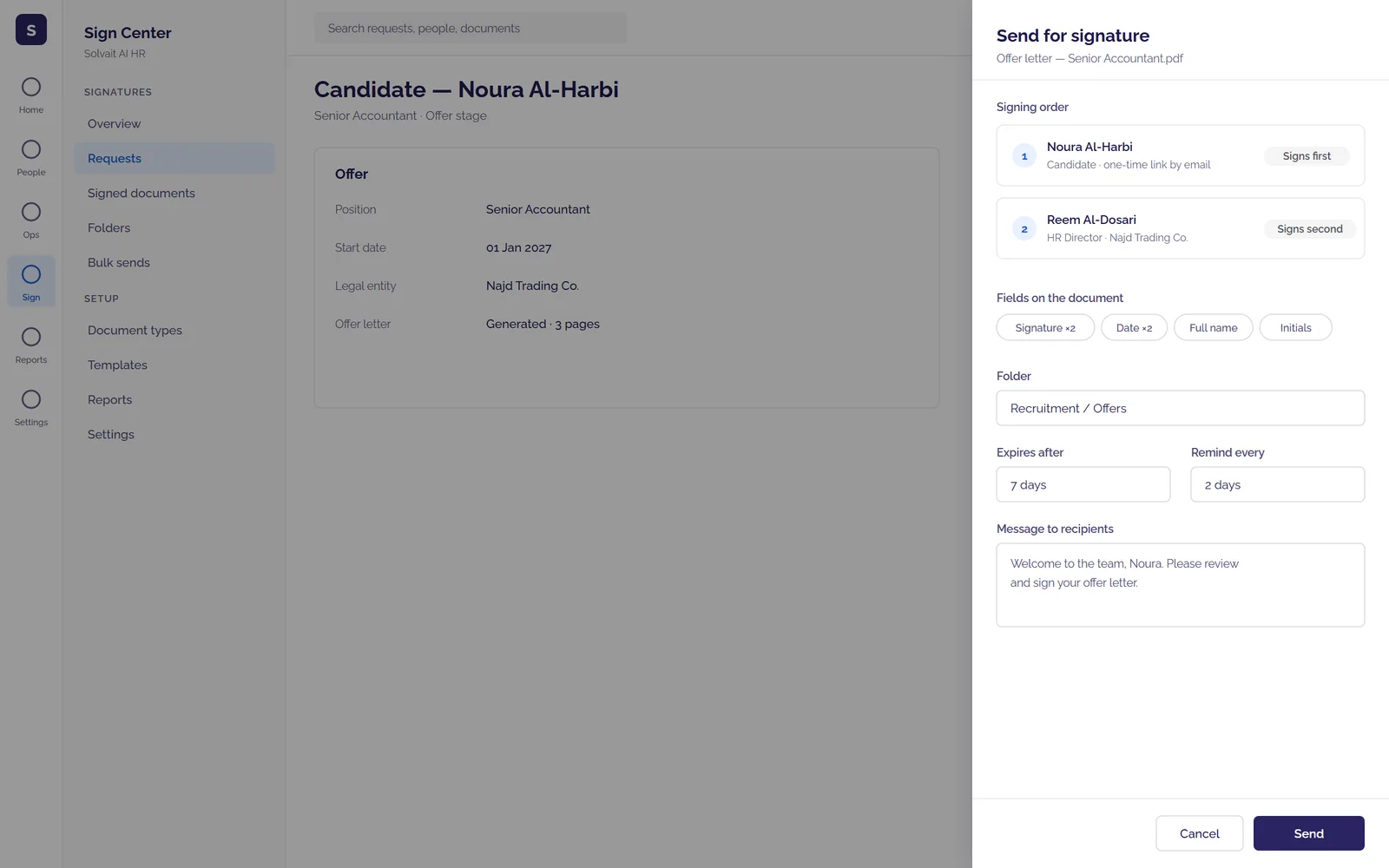
    When an offer letter is ready, send it for signature from the candidate's page. Set who signs first, the folder it files into, when it expires and how often to remind.

    • Signing order, one signer after another
    • Candidates sign from a one-time link sent to their email
    • Expiry and automatic reminders on every request
    Product illustration · Send for signature
    A side panel in Solvait listing two signers in order, with folder, expiry and reminder settings.
    02
    Sign Center

    Every signature your company is waiting for, on one page.

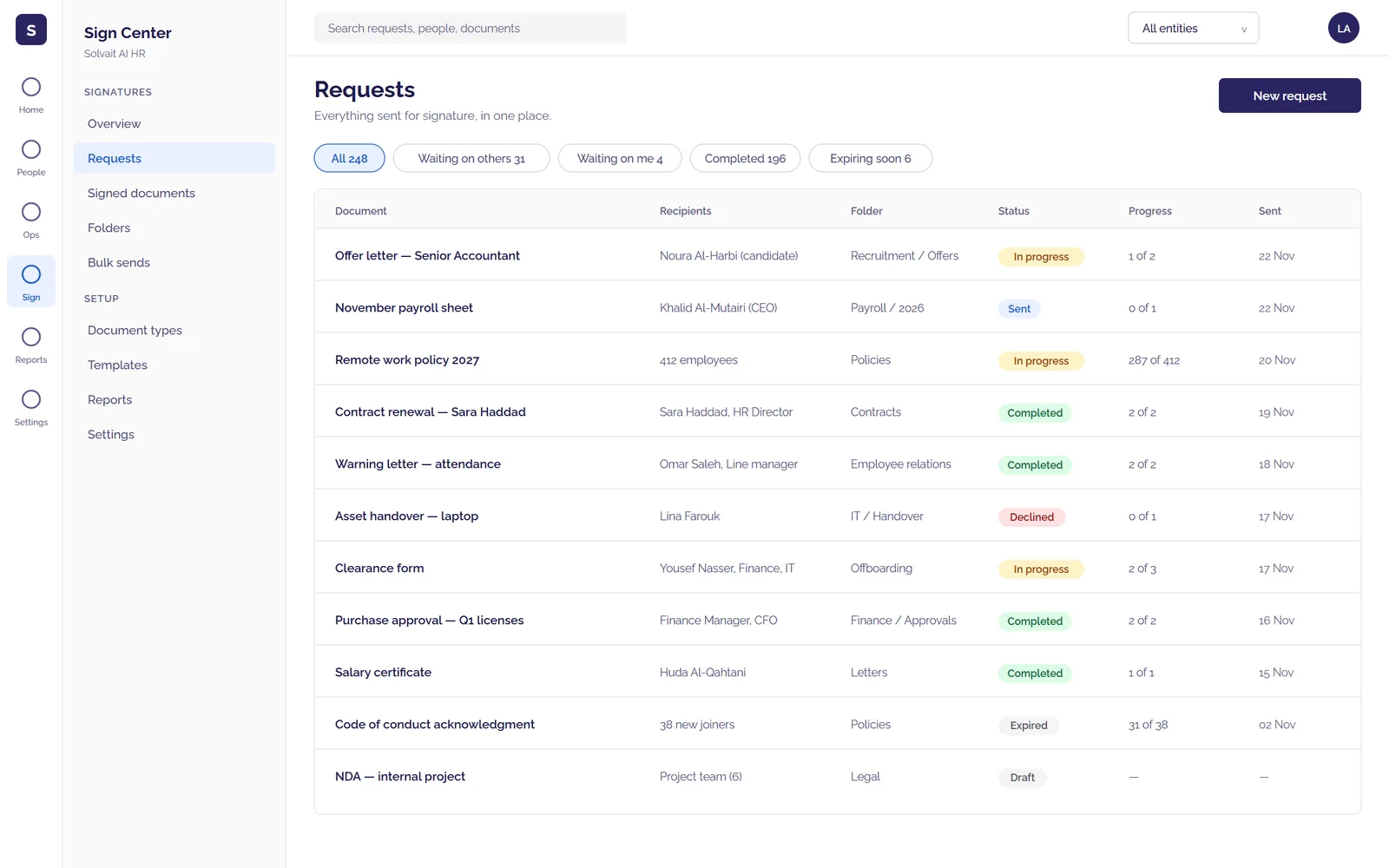
    One place for every request: what is waiting, on whom, and what is about to expire. It opens from the same menu as the rest of Solvait.

    • Waiting on others, waiting on me, completed, expiring soon
    • Filter by legal entity
    • Signed documents, folders and templates in the same menu
    Product illustration · Sign Center
    Solvait Sign Center showing a table of documents sent for signature with their status.
    03
    Bulk send

    One policy, every employee, one step.

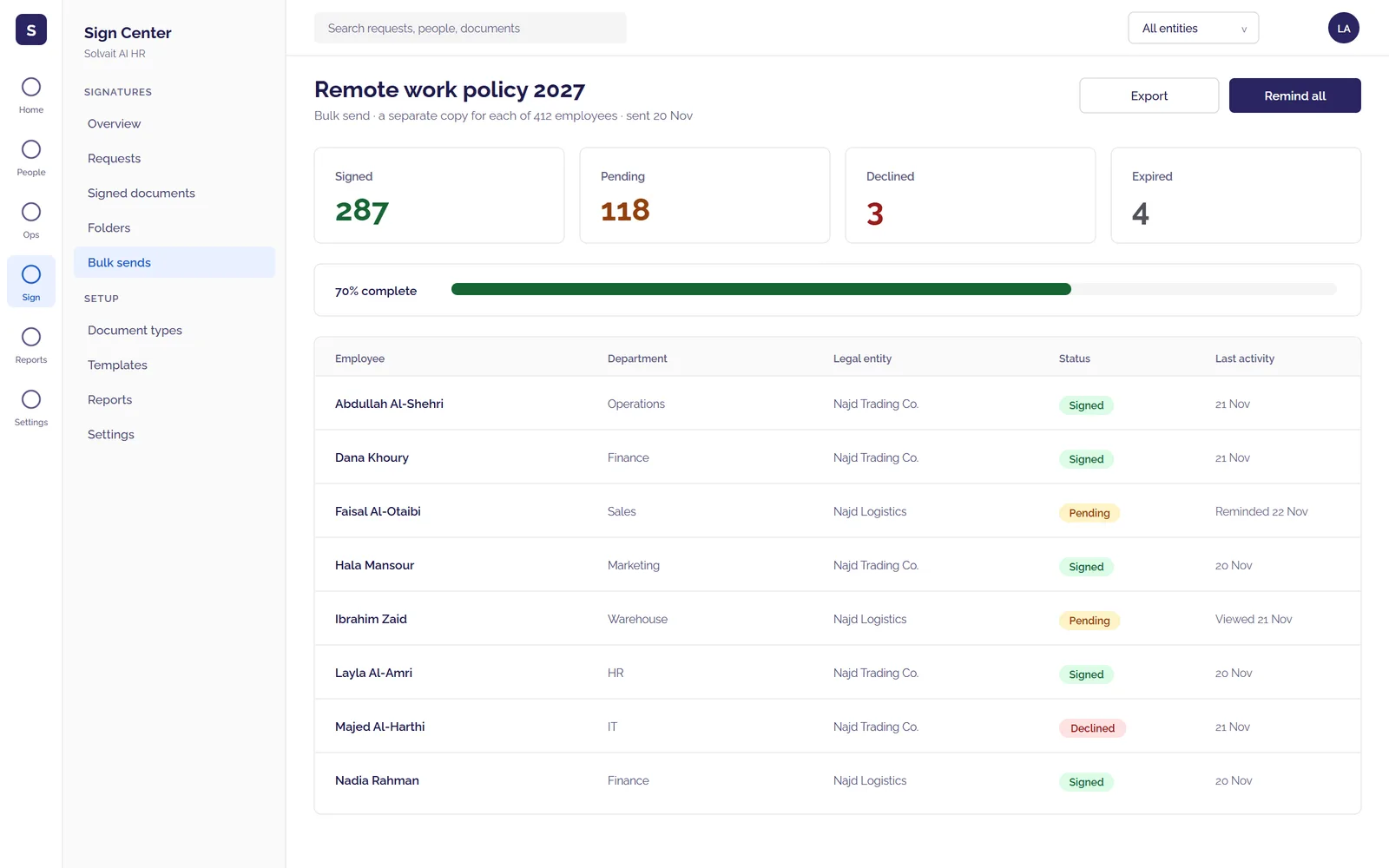
    Send a policy to a department or the whole company. Each employee gets their own copy; you see who has signed and who hasn't, and remind the rest in one click.

    • A separate copy for each employee
    • Signed, pending, declined and expired at a glance
    • Remind everyone outstanding, or export the list
    Product illustration · Bulk send
    A progress screen for a policy sent to every employee, with signed, pending, declined and expired counts.
    04
    Signed PDF

    Locked, certified, filed.

    The final document is locked. A certificate page lists the signers, the times, how each was identified, and a fingerprint of the file that shows if it is ever altered.

    • Certificate page with the full audit trail
    • How each signer was identified, on the record
    • Filed into the folder you chose, with access control
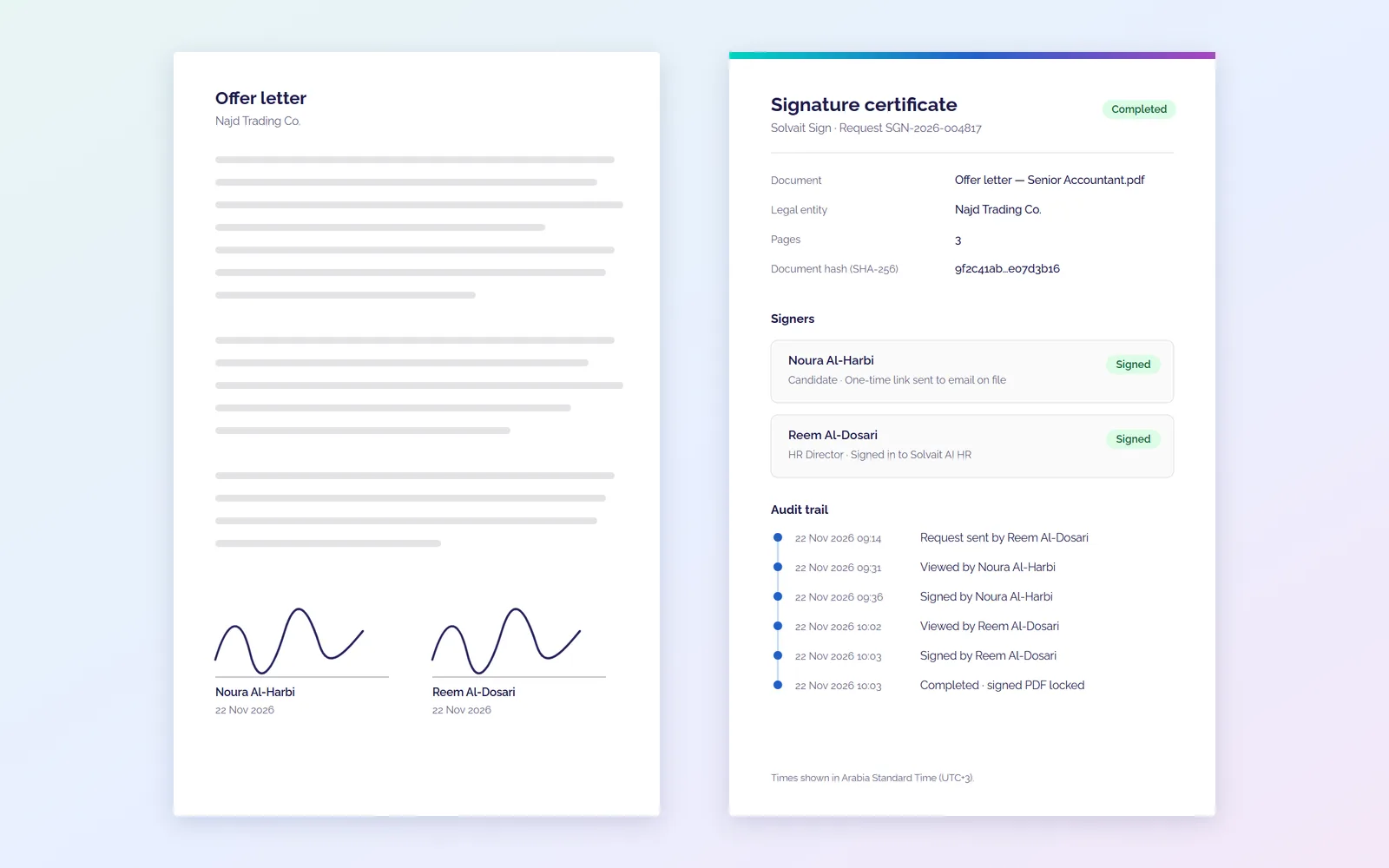
    Product illustration · Signed PDF
    A signed offer letter beside a certificate page listing signers and an audit trail.
    For HR

    The documents HR sends every week.

    Sent, signed and filed without leaving Solvait.

    Offer letters signed the same day.
    Send from the candidate's page in Attract or AI HR. The candidate signs from a one-time link on their phone; HR countersigns; the signed copy files itself.
    Payroll sign-off without the paper sheet.
    The approver signs the payroll sheet on their phone. A backup approver can be named, so one person's absence never holds up salaries.
    Policies acknowledged by everyone.
    Send one policy to a department or the whole company. Each employee gets their own copy; you see who has signed, who hasn't, and remind the rest in one click.
    Renewals, warnings, clearance, letters.
    The documents HR already generates in Solvait can be sent for signature in the same step.
    Templates.
    Set up a document once, with its fields and signers, and reuse it.
    Candidates, without an account.
    Candidates in your hiring process sign from a secure one-time link. No account to create and no app to install.
    Control and record

    The details HR and IT both ask about.

    Who signs, in what order, where the copy lives and who can open it.

    Draw, type or upload
    Signers draw, type or upload a signature, and can save it for next time.
    Arabic, right-to-left done properly
    Every signing screen works in English and Arabic, with the layout mirrored for right-to-left.
    Notified where they already are
    Signers get an in-app notification and an email with the link.
    Extra confirmation when it matters
    For sensitive documents, the company can require signers to re-confirm it is them before signing.
    Signing order, reminders, expiry
    Set who signs first, how often to remind, and when a request lapses. Requests can be declined or voided.
    Folders with access control
    Payroll, Recruitment, Contracts, with sub-folders. People see only the folders they are allowed to.
    Share by link, safely
    Every document has a link you can paste to a colleague. It opens only for people who already have access.
    Several legal entities
    Groups with several legal entities keep each company's documents separate, with shared templates where they want them.
    Common file types
    PDF, Word and images (JPG, PNG). Up to 40 files per request, 25 MB per file.
    Built in

    Inside the Solvait products you already run.

    Sign opens from the same menu as the rest of Solvait, with the same login and the same employee records.

    Works alongside Qiwa

    In Saudi Arabia, employment contracts are documented on Qiwa, and that does not change. Solvait Sign handles what sits around the contract: the offer, the payroll sign-off, the policies and the letters.

    Questions HR and IT ask first

    What teams want settled before signatures move inside the HR system.

    Electronic signature built into Solvait AI HR, PeopleHub, Attract and Wise. Offer letters, payroll sign-off, policy acknowledgments and letters are sent, signed and filed without leaving Solvait.

    No. They sign with the Solvait login they already have.

    From a secure one-time link sent to their email. No account needed.

    Yes, fully, including right-to-left layout. Each signer can sign in English or Arabic.

    The documents HR uses inside your company: offer letters, payroll sheets, policies, renewals, letters and clearance forms.

    It is a standard electronic signature with a locked document and a full audit trail. In Saudi Arabia, employment contracts are still documented on Qiwa; Sign covers the offers, approvals, policies and letters around them. For anything unusual, your legal counsel decides which documents it suits.

    Through their Solvait login, or a one-time link sent to the contact on file. It does not do government ID verification.

    A locked PDF with a certificate page showing the signers, the times and the full activity trail.

    Only people with access to the folder. Shared links open only for people who already have access.

    Yes. Each entity's documents are kept separate; templates can be shared across the group.

    No. Contracts are documented on Qiwa. Sign handles the documents around them.

    For as long as your Solvait account is active, unless your administrator sets a different retention policy.

    Signed. Filed. Done.

    Already a Solvait customer? Talk to your account manager to switch Sign on. New to Solvait? Book a demo.

    Solvi — Solvait AI assistant
    Solvi
    Smart Assistant — Powered by AI
    Welcome to Solvait! 👋 I'm Solvi, your AI assistant. How can I help today, exploring our HR tools, learning about the platform, or booking a demo?