

Introducing AI Employee Data Validation: A Pre-Payroll Readiness Scan Built Into Solvait HCM
Solvait now ships AI Employee Data Validation, a pre-payroll readiness scan that reviews your employee data before you run payroll and flags what would break the run: a missing Iqama number, a wrong end of service method, a GOSI setup gap. It runs inside Solvait HCM, launched straight from the Pay Cycle form under AI Tools. The AI finds and flags the problem. A person on your team reviews it and decides whether to correct it. That last line is the whole design, and it is deliberate.
We built this because the most expensive payroll problems in Saudi Arabia are not calculation mistakes. They are data mismatches you find out about after the fact, when a WPS file bounces or a GOSI notice lands, and payroll is already under deadline pressure.
Why does bad payroll data surface at the worst moment?
Payroll accuracy is a data problem before it is a math problem. The math engine is fine. It is the record feeding it that is wrong, and by the time the run exposes that, you are correcting retroactively.
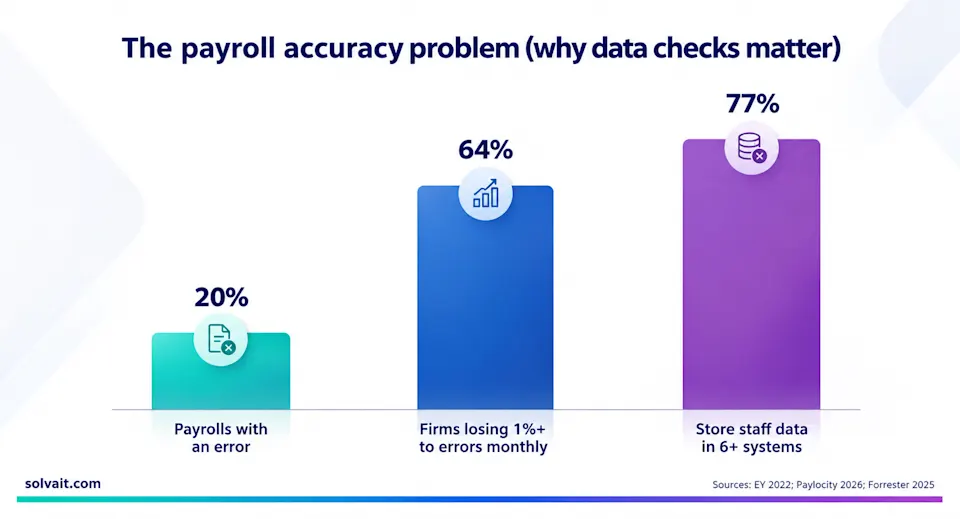
The scale is well documented. EY found that one in five payrolls contains an error, at an average of 291 dollars to correct each one. Paylocity's 2026 State of Payroll research found 64 percent of organizations lose at least 1 percent of total payroll spend every month to errors and inefficiencies. And the root cause is structural: Forrester found 77 percent of organizations store employee data across multiple HCM systems, drawing on six or more on average, so every re-entry is another chance for a figure to be wrong.
In Saudi Arabia the stakes are higher than a correction fee. Mudad cross references your wage file against GOSI records and Qiwa contracts, and a mismatch between the contract, the GOSI wage, and the actual transfer is flagged automatically. Regulators watch for the "silent drift" pattern, where a salary changes in payroll but the Qiwa contract lags behind. A WPS rejection there does not just cost time. It can delay salaries and touch your Nitaqat standing.
What does the pre-payroll readiness scan actually check?
The scan reads the employee data that drives a clean pay run and grades it before the run, not after. It is decision support, so it explains the risk rather than silently changing anything.
When you find it | Without the scan | With the readiness scan |
Bad Iqama number | After WPS rejects | Flagged before you post |
Wrong EOS method | In the pay run | Flagged with the impact |
GOSI setup gap | On a mismatch notice | Flagged before the cycle |
Who fixes it | Rushed, retroactive | Reviewed, then corrected |
Who decides | Payroll, under pressure | Payroll, before posting |
Each flagged employee gets a validation score and a payroll risk level. The scan checks the data that actually moves a pay run: Iqama number, contract and leave data, the end of service calculation method, calendar and shift setup, financial dimensions, and social insurance configuration. For each finding it states the likely impact in plain terms, such as WPS rejection, incorrect accrual, an attendance effect, a blocked ledger posting, or a failed social insurance submission. Then it sorts findings into priority tiers: High or Critical to review before payroll, Medium to check, Low for information.
You can scope the scan by hiring period, employee, nationality, department, position, or pay cycle, and run it immediately or as a batch job. Findings export to Excel, and each carries a recommended action and a status you move through as your team works it: New, Reviewed, Accepted, Rejected, Resolved, Ignored.
How does it work, and where does the human stay in charge?
The flow is a loop with a person at the center, by design. The AI never posts payroll or edits a salary on its own.
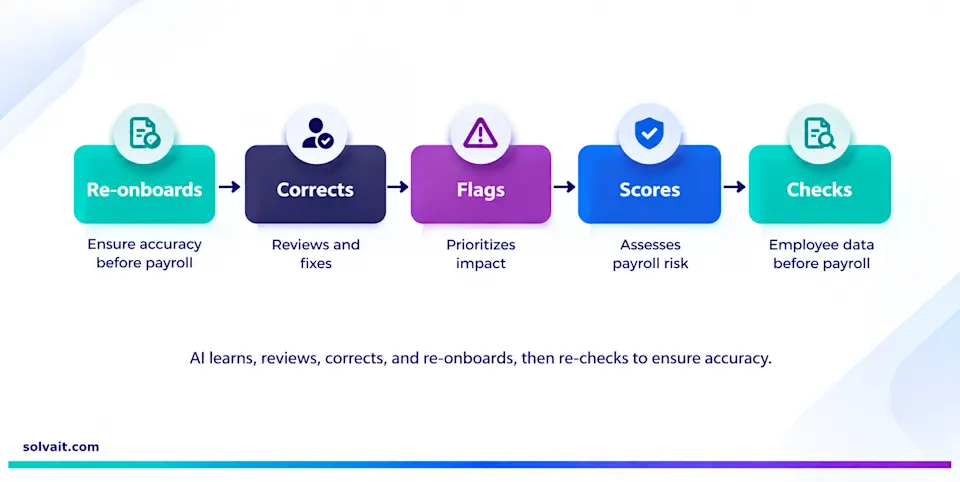
It scans the employee data before the run, scores each record and its payroll risk, and recommends an action with the priority and the impact attached. Then an authorized person reviews the finding and corrects the data if needed. After a correction, you re-run the scan to confirm the issue is cleared before you post the cycle. The AI flags; people decide; the re-scan proves it is fixed.
This matters for accuracy and for accountability. GOSI contributions, end of service settlements under Articles 84 and 85, and WPS submissions all carry consequences your company answers for, not an algorithm. So the validation is decision support: it does not auto correct data, auto fix records, or auto submit anything. If you want to see how it fits the wider payroll picture, Solvait HCM runs the full cycle, and the scan lives right on the Pay Cycle form.
FAQ
What is AI Employee Data Validation?
It is a pre-payroll readiness scan in Solvait HCM that reviews employee data with AI before a pay run and flags missing, incorrect, or inconsistent records that would cause payroll problems. Each finding gets a validation score, a payroll risk level, and a recommended action. It is decision support: a person reviews and corrects, and the AI does not change data on its own.
Does it fix the data automatically?
No. The scan flags issues, explains the likely payroll impact, and recommends an action, but a person reviews each finding and decides whether to correct it. It never auto corrects records or auto submits a WPS file. After you make a correction, you re-run the scan to confirm the issue is resolved before posting.
How does it help prevent WPS rejections?
Most WPS rejections in Saudi Arabia come from data mismatches, not missing money: a wrong ID number, a salary that does not match the registered Qiwa contract, a GOSI setup gap. The scan surfaces those records before you post the pay cycle, so you correct them ahead of submission instead of after Mudad rejects the file.
Where does it run?
Inside Solvait HCM. You launch it from the Pay Cycle form under AI Tools, scope it by employee, department, nationality, or pay cycle, and run it immediately or as a batch job. Findings export to Excel with a status workflow your team moves through.
The next step
Bad employee data does not have to become a WPS rejection or a rushed retroactive fix. The readiness scan moves that discovery to before the run, where a correction is routine, and keeps a person in charge of every decision.
To see AI Employee Data Validation on your own pay cycle, book a demo with Solvait and we will run a scan against a real cycle from your team.
References
EY, Payroll errors average $291 each, 2022 (one in five payrolls contains an error; $291 average correction; 15 corrections per period)
Paylocity, 2026 State of Payroll, 2026 (64% of organizations lose 1%+ of payroll spend monthly to errors and inefficiencies)
Forrester Consulting, single-database HCM research, 2025 (77% store employee data across multiple systems; six or more on average)
MHRSD / Mudad, Wage Protection System, 2026 (WPS cross-references GOSI and Qiwa; mismatches flagged automatically)
PwC UK payroll research, 2025 (payroll error cost for a large enterprise runs into the tens of millions per year)
See agentic HR in action
Solvait AI HR and its agents prepare Saudi labor-law work so HR can review it before anything is submitted.
Tags
Related Posts

Saudi Labour Law Automation: 9 Clauses to Enforce
Nine Saudi labour law clauses your HR system should enforce automatically after the 2025 reforms, from probation caps to WPS files.
Aug 30, 2026
Saudi Salary Calculator: 4 Scenarios Run Live
Four real Saudi salary levels taken from gross to net, with the GOSI deduction worked out , plus a free calculator that returns the figure in seconds.
Jul 19, 2026

Free Saudi Salary Calculator
Free Saudi salary calculator. Work out gross, GOSI, end of service, and net pay in 30 seconds.
Jun 20, 2026