Employee Self Service on WhatsApp: What the Khidmat Agent Answers
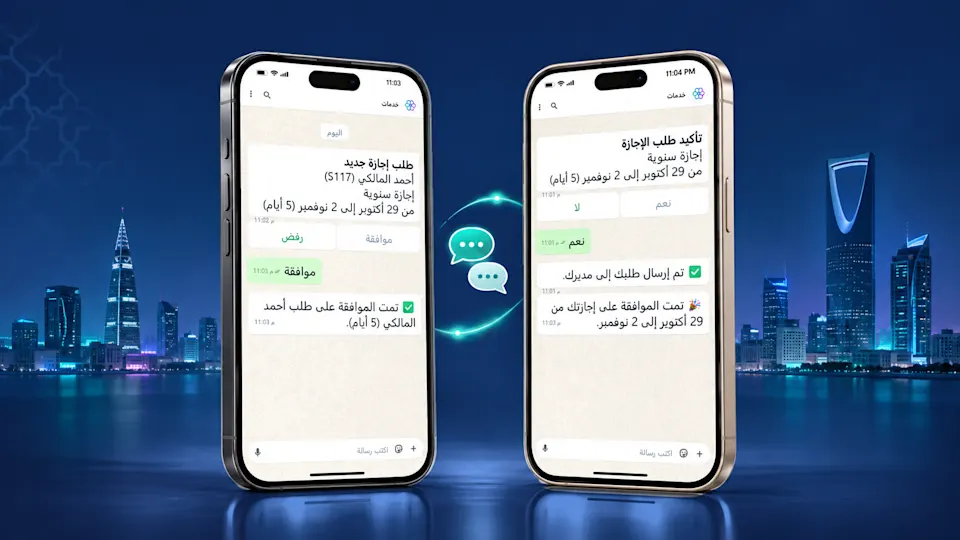
Employee self service means an employee completes a request without waiting on HR. Solvait's Khidmat agent takes that idea to the place your people already use every day: WhatsApp. The employee writes a request in Arabic, the agent reads the intent, prepares the form, checks policy and balance, then routes it for HR approval.
The idea is simple: you ask, it works out the form. No separate portal, no new login, no PDF to hunt down. Just a message on WhatsApp in Arabic.
That is different from both a traditional self service portal and a basic chatbot. The portal shows you the forms and leaves you to fill them. The chatbot answers general questions, then hands you to a human. The agentic agent reads the request, prepares it, runs the routine steps, and leaves the final decision to your team.
This guide covers why WhatsApp became where self service lives, how the Khidmat agent works step by step, and what sets it apart from a portal and a chatbot.
Key takeaways
The Khidmat agent delivers employee self service on WhatsApp in Arabic: leave, loans, clock-in, salary letters.
The agent reads, prepares, and completes the routine request, then routes it to the right agent and to HR for approval.
Nine in ten Saudi adults use WhatsApp daily, according to BCG, so the service reaches the employee where they already are.
The agent does not compute entitlements itself. A deterministic rules engine does the math; the AI reads, routes, and prepares.
The decision stays human: the agent prepares and proposes, HR approves. There is no automatic approval.
Why did WhatsApp become where self service lives?
Most HR systems put self service behind a portal: a link, a username, a password, and a list of forms. The result is that many employees skip the portal and message someone in HR instead. The load returns to the very team the portal was meant to relieve.
The numbers explain why. According to BCG, nine in ten Saudi adults use WhatsApp daily, and DataReportal reports that Saudi Arabia counted 34.1 million social media identities in January 2025, equal to 99.6% of the population. The employee is already on WhatsApp. It makes more sense to meet them there than to ask them to learn a new portal.
There is a second reason, about the volume of routine work. McKinsey estimated that 56% of hire to retire tasks could be automated with current technology and limited process change. Those tasks, such as a leave request, a salary letter, or a balance check, are exactly what eats your team's time. SHRM reports that 68% of organizations use self service tools, with that share expected to approach 80% within a year.
The point is this: routine requests are repetitive and automatable, and the employee is already on WhatsApp. The question is how to run self service on WhatsApp without losing control.
How does the Khidmat agent work on WhatsApp?
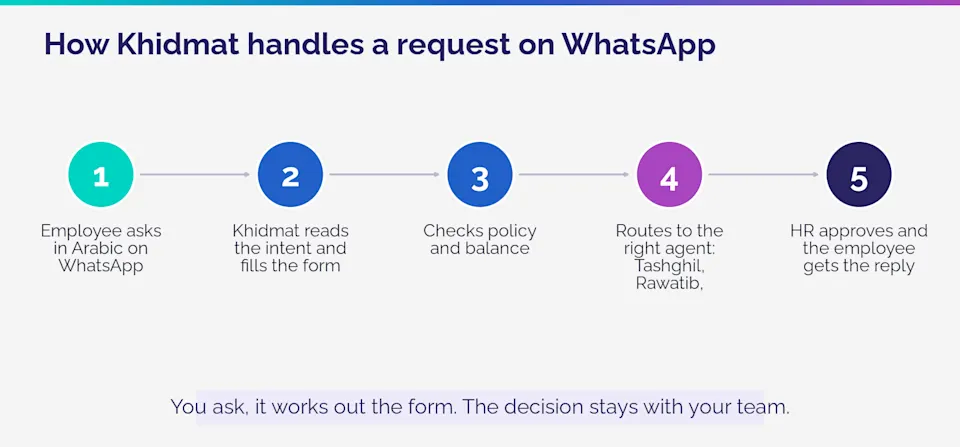
The Khidmat agent is the surface the employee talks to. It takes the request in natural Arabic, not fixed commands, then moves through five steps.
The employee asks in Arabic on WhatsApp. "I need three days off starting Sunday," or "I need a salary letter for the bank."
Khidmat reads the intent and fills the form. It turns the message into a structured request: the type, the dates, the attachments needed.
Checks policy and balance. It confirms the request is possible: leave balance is sufficient, and the request fits company policy.
Routes to the right agent. It passes the request to the correct agent: Tashghil for leave and loans, Rawatib for any financial impact, Mutaba'aa for any compliance angle.
HR approves and the employee gets the reply. A manager reviews the prepared request, approves it, and the employee receives a result notification on WhatsApp.
One point is central to the design: the agent does not compute an entitlement itself. Sensitive numbers, such as leave balance or an end of service amount, are computed by a deterministic rules engine that applies Saudi labor law and your company policy. The AI's job is to read the language, structure the request, and prepare it for review. That is how conversational ease meets auditable accuracy.
What sets the Khidmat agent apart from a portal and a chatbot?
Any HR team has three options: a self service portal, a basic chatbot, or an agentic agent on WhatsApp. The difference is not the look. It is who does the work and in what language.
Criterion | Self service portal | Basic chatbot | Khidmat agent on WhatsApp |
|---|---|---|---|
Where does the employee work? | Separate portal with login | Chat window | WhatsApp in Arabic |
What does it do? | Shows forms only | Answers general questions | Understands and completes the request |
Your team's role | Data entry and chasing | Reply to the rest | Review and approve |
Let us be fair about the comparison. If your team is small and requests are few, a simple self service portal or even structured email may be enough. The difference shows up when headcount grows, the same requests repeat daily, and people want an answer in their own language inside the app they already open. At that point a neglected portal becomes a burden, and full visibility into the digital employee experience, from one familiar channel, makes a real difference to engagement.For a wider view of Arabic self service, read the Arabic employee self service portal guide.
Where the Khidmat agent fits inside Solvait
The Khidmat agent is one of four agents inside Solvait's agentic AI HR platform, and it is the surface employees talk to:
Khidmat (Services): answers employee questions and completes requests over WhatsApp in Arabic: leave, loans, clock-in, resignation.
Tashghil (Operations): orchestrates workflows such as leave, loans, and end of service, so your team sees decisions, not transactions.
Rawatib (Payroll): drives the payroll cycle, catches anomalies, and drafts the run for review before release.
Mutaba'aa (Compliance): watches dates and statutes continuously: iqamas, contracts, GOSI registrations, and Saudization warnings.
To be clear: Khidmat runs the routine steps and routes the request, but approval and the decision stay with your team. The assistance is intelligent, and always under human oversight. The Solvait platform connects to your existing HR system and works in Arabic and English. If what you need is an assistant that answers and executes inside one conversation, start with Solvait's HR Assistant.
Want to see Khidmat handle a real leave request on WhatsApp from start to approval? Book a demo with Solvait.
Frequently asked questions
What is employee self service?
Employee self service is when an employee completes their own requests, such as leave, a salary letter, or a balance check, without going through HR at every step. With the Khidmat agent, these requests happen in a WhatsApp conversation in Arabic instead of a separate portal.
How does an employee request leave on WhatsApp?
The employee writes the request in natural Arabic on WhatsApp. The Khidmat agent reads the intent, prepares the leave form, checks balance and policy, then routes it for HR approval, and the employee gets a result notification.
Does the Khidmat agent reply in Arabic?
Yes. The agent handles employees in natural Arabic on WhatsApp, and the Solvait platform supports Arabic and English.
What is the difference between a self service portal, a chatbot, and the Khidmat agent?
A portal shows forms and leaves the employee to fill them. A chatbot answers general questions, then hands off to a human. The Khidmat agent reads the request, prepares it, runs the routine steps, then routes it for human approval.
Which tools give full visibility into the digital employee experience?
Tools that bring employee requests into one familiar channel with human oversight. The Khidmat agent on WhatsApp unifies routine requests in a single Arabic conversation and links them to the Operations, Payroll, and Compliance agents inside the platform.
Does the Khidmat agent make decisions instead of HR?
No. The agent reads, prepares, and completes the routine steps and routes the request, but approval and the final decision stay with the HR team.
References
BCG, daily WhatsApp use among adults in Saudi Arabia (messaging apps as a gateway to digital services): Asharq Al-Awsat
DataReportal, Digital 2025: Saudi Arabia (34.1 million social media identities, 99.6% of the population): DataReportal
McKinsey, Human resources in the age of automation (56% of hire-to-retire tasks are automatable): McKinsey
SHRM, adoption of HR self service tools: SHRM
See agentic HR in action
Solvait AI HR and its agents prepare Saudi labor-law work so HR can review it before anything is submitted.
Tags
Related Posts
AI HR Assistant: The Chatbot Conversation
How an agentic HR assistant answers employee questions in Arabic around the clock, and completes the task instead of just replying.
Aug 9, 2026
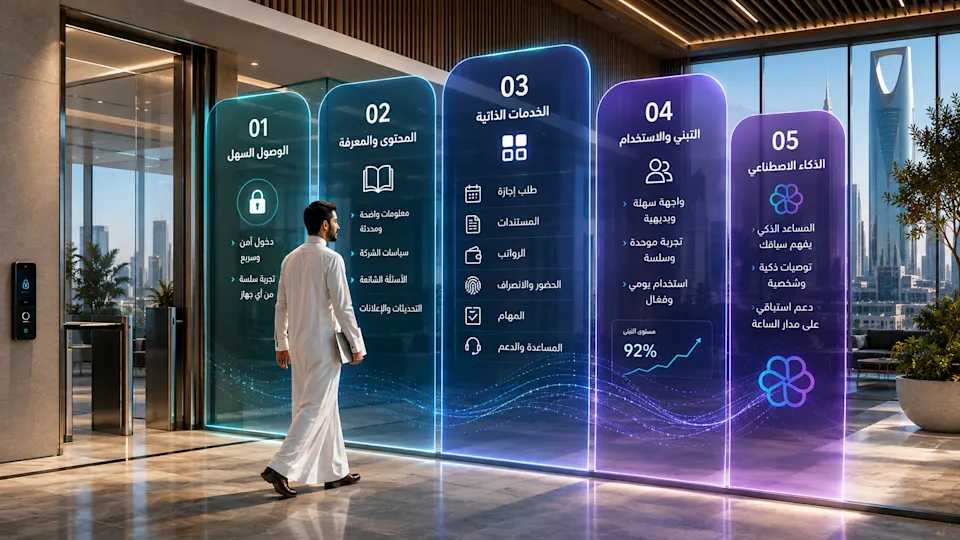
Arabic First Employee Self Service Portal Guide
How to build an Arabic first employee self service portal your staff actually use in Saudi Arabia: the 5 layers, adoption benchmarks, and where AI fits.
Sep 1, 2026

Posting Blocked: AI Salary Audit Stops Payroll Errors
AI salary audit blocks a wrong pay run before payday. See how payroll software identifies errors before employees are paid, with a human in the loop.
Nov 5, 2026