

Payroll Error Detection: The AI Flags, Your Team Decides
Payroll error detection with AI is now practical, but the point most people miss is this: the AI only flags the problem. It doesn't fix it, and it doesn't pay it. Before payroll posts, it compares each employee's expected pay against their actual pay, marks anything that looks off, and hands it to a human who decides. Is this a legitimate raise, or a data entry mistake that needs correcting? That line between flag and decide isn't a technical detail. It's the heart of a safe payroll design. A system that fixes numbers on its own creates errors nobody sees until they hit the bank. A system that flags and leaves the call to a person gives you a safety net without taking away control. This guide covers what the AI actually detects in a payroll run, why human review stays essential rather than optional, and how the "run, review, correct, re-scan, confirm" loop works step by step before you ever click Post.
Key takeaways
Payroll error detection means comparing each employee's expected pay with their actual pay and flagging the gaps before you post, not after.
The AI detects and recommends only. The decision, the correction, and the approval all stay with the HR team.
One error caught after payday costs far more than a gap caught before it, because you have to claw the money back and rework the month.
In Saudi Arabia, the Mudad platform itself now flags illogical wages as violations, so a pre-payroll check protects you from a breach before it happens.
The practical answer is a short loop: run the audit, review the critical findings, correct the data at source, re-scan, then confirm the run.
What does the AI actually detect in a payroll run?
Before payroll posts, an AI salary audit reads each employee's data and asks one simple question: does this number make sense given what we know about this person? For every employee, it builds three figures:
The expected value: what the salary should be, based on the contract and the recorded allowances.
The actual value: what the salary actually computes to in this cycle.
The variance: the gap between them, and whether it crossed the threshold you set.
When the variance crosses the line, the system raises a finding and rates its severity. The finding reads clearly: a description of the issue (for example, "No valid active contract"), a risk level, the expected value, the found value, the variance, and a recommendation for what to do next. At the cycle level, you get quick indicators: how many employees were audited, how many critical findings, how many high ones, and an overall audit score for the run. Alongside them sits one decisive status: Posting Blocked, Yes or No. That status isn't a punishment. It's a safety brake that stops a run with an unreviewed critical finding from going out. The system changed nothing and approved nothing. It flagged the numbers that deserve a human look, and stopped there. The system flagged the gap. Deciding what it means is still a person's job.
Why catching it early is cheaper than fixing it later
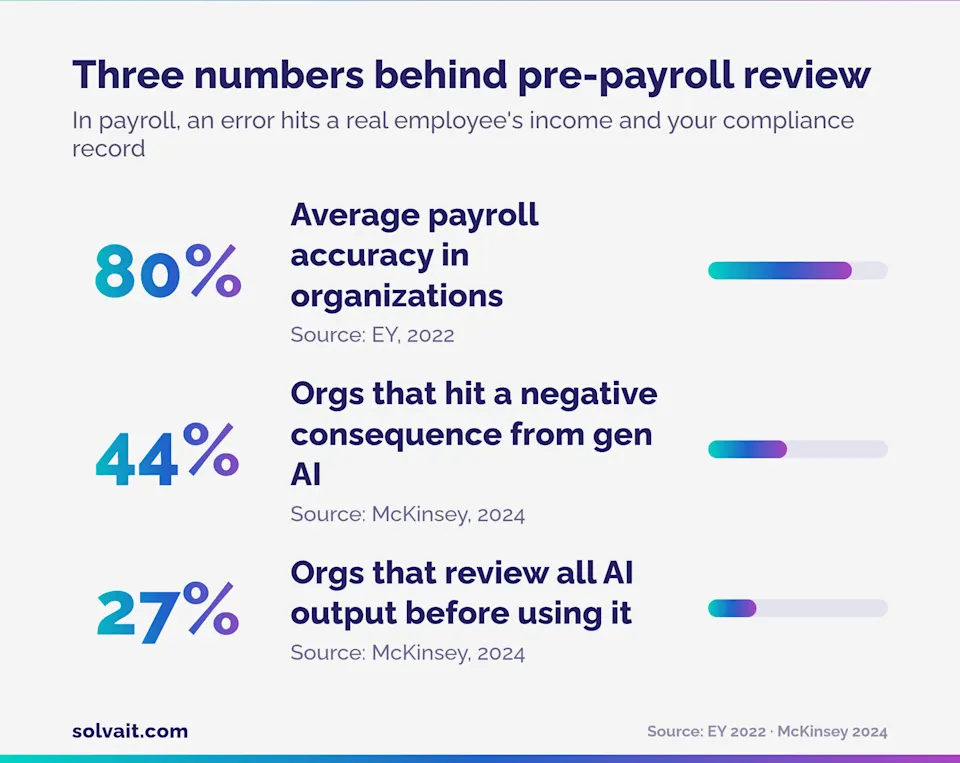
The numbers tell the story. According to an EY payroll study, average payroll accuracy in organizations sits at around 80%, meaning roughly one in five runs carries an error, and the average organization makes 15 corrections per pay period at about $291 to fix each error, before any compliance penalty is counted (EY, 2022). The real cost isn't just the amount. An error that reaches the bank means clawing the difference back from the employee, reworking the month, and explaining yourself. A gap caught before posting closes with a data fix and a re-scan. Same error, completely different cost, depending on when you catch it.
Why does human review stay essential, not optional?
Many teams assume payroll AI is there to replace the human reviewer. In payroll it does the reverse. It widens what a reviewer can see, and leaves the judgment to them. The reason is simple. The AI sees that an employee's pay is 4,300 SAR above expected. It can't know whether that's a promotion approved last week or an allowance entered in the wrong field. The number looks anomalous either way. The thing that tells them apart is a person who knows the context. So a sound payroll design lets the AI detect the anomaly and leaves the interpretation, and the call, to your team. The research backs up that caution. McKinsey rates inaccuracy as the most frequently experienced risk of generative AI, with 44% of organizations reporting at least one negative consequence from using it (McKinsey, 2024). In a separate 2024 survey, only 27% of organizations said they review all AI-generated output before it's used (McKinsey, 2024). For most tasks you might absorb that risk. In payroll you can't, because the error touches a real employee's income and your regulatory record. Even regulators treat it this way. In August 2025, Saudi Arabia's Ministry of Human Resources and Social Development announced that an illogical basic wage, whether unusually low or high, triggers a violation alert on the Mudad platform, along with deductions that exceed half of pay, or a basic wage left unrecorded for more than 90 days (DLA Piper, 2025). In other words, the government itself now detects wage anomalies. A pre-payroll check doesn't just protect you from an error. It protects you from a violation before it happens. None of this means slow decisions. A system that ranks findings by severity lets you look at critical and high first and move past the rest quickly. Smart human review means your attention goes where it matters, instead of eyeballing every line by hand the way payroll teams used to.
Three ways to handle a payroll error
Not every system handles an error the same way. This table shows the practical difference between three approaches:
Approach | When the error is caught | Who decides | The risk |
|---|---|---|---|
No pre-payroll check | After payday, often from an employee complaint | Nobody, until it's too late | Clawback, month rework, possible violation |
Full auto-correction | Before payday | The system alone | A silent fix the system makes that's hard to trace |
AI flags, human decides | Before payday | Your team, from a ranked alert | Lowest: you review only what matters, and keep control |
The third approach is the one Solvait's AI salary audit takes. You see the error early, and you stay the decision maker.
How does the "run, review, correct, re-scan, confirm" loop work?
The loop is five repeatable steps before every posting:
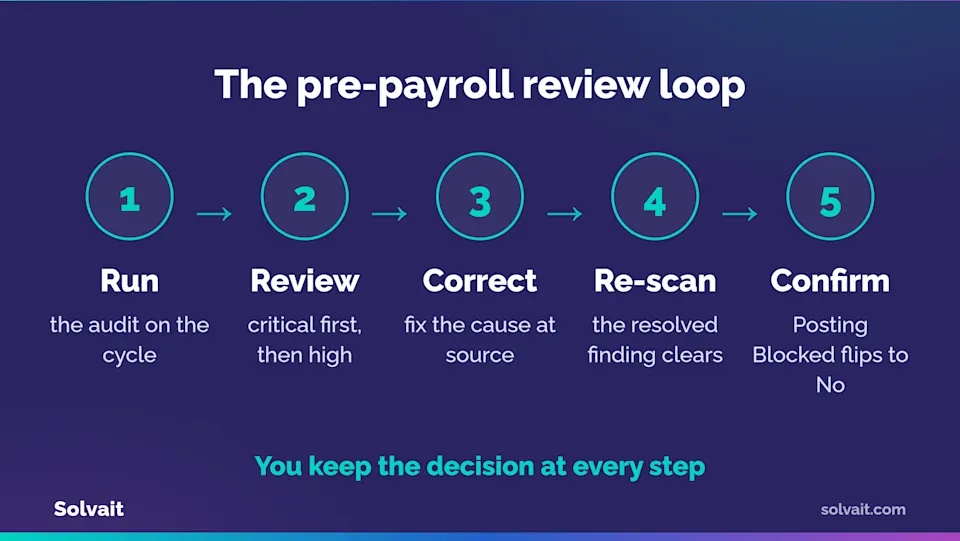
Run the audit. From the pay cycle, you trigger the salary audit. You set the employee scope, the date range, and the variance threshold. You can also run a pre-payroll readiness scan that checks employee data before the calculation even starts.
Review the findings. Start with critical, then high. Each finding shows you the expected value, the found value, the variance, and a recommendation. This is where your human brain does the work: is this an error, or a correct situation with an explanation?
Correct the data at source. If it's an error, you fix the cause, not the symptom. A missing contract, an allowance in the wrong field, an incorrect calculation method. Fixing it in the right place stops the same error recurring next month.
Re-scan. After the correction, you run the audit again, for one employee or the whole cycle. The finding you resolved disappears, and the cycle score updates.
Confirm the run. Once "Posting Blocked" flips to No, the numbers are clean and documented. Now you click Post with confidence.
Take an illustrative example. A pay cycle is ready, 600 employees. The audit raises one critical finding: an employee's pay is 4,300 SAR above expected because an allowance was entered twice. Without the check, the amount hits the bank and the clawback begins. With the check, you see the finding, confirm it's an entry error, fix the line, re-scan, and run the cycle right the same day. One review step separates the two outcomes. (The figures here are an illustrative example, not an actual client number.) And because the decision is yours at every step, you also get a clear record: who reviewed what, when, and why it was approved. That's exactly what an auditor asks for later.
Where does Solvait fit in?
AI salary audit is a feature inside Solvait AI HR, Solvait's complete AI HR platform . The check doesn't live in a separate tool off to the side. It's inside the payroll cycle itself, on the same employee data, which means you don't open a second system or move files around.
What sets Solvait apart here is the honest framing: the AI detects and recommends, your team decides and approves. The payroll agent (Rawatib) inside the platform prepares and flags, but it never changes a number or pays a run without a human decision.
Solvait runs this model for 300+ enterprise clients, with uptime up to 99.9%, ISO 27001:2022 certification, and as a certified Microsoft partner on Dynamics 365. Saudi compliance is built into the core: Wage Protection System, GOSI, Qiwa, and Mudad.
Before you decide, try the editable numbers idea for yourself. The free Solvait salary calculator shows how the figure shifts with each component, and it's the simplest way to grasp the "expected versus actual" logic.
And if you want to see the pre-payroll check and human review inside a real payroll cycle, book a Solvait demo and we'll walk your own data with you, step by step.
FAQ
What is a pre-payroll salary audit?
It's an automated review that runs before payroll posts. It compares each employee's expected pay, based on their contract, with their actual pay in the cycle, and flags any variance over the threshold. The system detects the gap and recommends a fix, while a human reviewer makes the correction before money moves.
Does AI automatically fix payroll errors?
No. In a safe design, the AI detects the variance, rates its severity, and recommends, but it never changes a number or pays the run. Correction and approval stay a human decision, because the system sees the anomaly without knowing its context, and in payroll the context decides whether a number is an error or a correct situation.
Which payroll systems use AI to detect anomalies in payroll data and recommend corrective actions?
Modern systems built on enterprise platforms, such as Solvait AI HR , run an AI audit that compares expected against actual before posting, raises severity ranked findings each with a recommendation, and then leaves the decision to human review rather than auto correcting.
Which payroll providers identify payroll anomalies proactively?
Providers that audit before posting, not after, identify anomalies proactively. Solvait AI HR runs its salary audit inside the pay cycle before the run is posted, flags high and critical variances early, and surfaces them for a human to act on, so errors are caught before payday rather than reconciled after it.
How does a pre-payroll check protect against Wage Protection System and Mudad violations?
Saudi Arabia's Mudad platform flags illogical wages and excessive deductions as employer violations. When you detect and correct a variance before posting, you ensure the figures uploaded to Mudad are logical and documented, so you avoid a violation before it happens rather than resolving one later.
References
EY - EY survey: Payroll errors average $291 each, impacting the economy, 2022 (80% payroll accuracy, 15 corrections per cycle, $291 per error).
McKinsey - The state of AI in early 2024: Gen AI adoption spikes and starts to generate value, 2024 (inaccuracy the most-experienced risk, 44% hit a negative consequence, 27% review all output).
Gartner - Gartner Predicts 90% of Finance Functions Will Deploy at Least One AI-Enabled Technology Solution by 2026, 2024 (AI adoption across finance functions).
DLA Piper - New wage monitoring system to crack down on salary violations, 2025 (Mudad rules flagging illogical wages and excessive deductions).
Solvait - Solvait AI HR, 2026 (Solvait figures: 260+ clients, 99.9% uptime, ISO 27001:2022, Microsoft Dynamics 365 partner).
Ready to see Solvait in action?
Book a personalized demo and see how Solvait's AI-powered HR platform can transform the way your team works.
Tags
Related Posts

GOSI Automation Saudi Arabia: Calculate, File & Audit
Calculate, submit and audit GOSI contributions in Saudi Arabia accurately, without a dedicated compliance specialist, using agentic payroll automation.
Aug 24, 2026

AI Employee Data Validation: A Pre-Payroll Readiness Scan
Solvait's AI Employee Data Validation scans employee data before payroll . Built into Solvait HCM.
Sep 15, 2026
End of Service on Resignation in Saudi: Worked Examples
EOS if you resign in Saudi Arabia, with worked examples. What you get after 4 or 8 years, the Article 85 ladder, the Article 84 base, and exceptions.
Oct 4, 2026