

How to Route Every Leave and Excuse Request to the Right Manager Automatically
Automatic request routing means your employee self service system sends every leave and excuse request to the correct approver based on the reporting line, without the employee having to find or guess who their manager is. A good system does four things in one move: it routes the request down the right chain, delegates to a backup when the manager is away, raises an alert if the response stalls, and logs every step in an auditable record. One thing stays with a human: the approval decision itself.
The idea is simple. The execution is what separates an HR team chasing requests across email and WhatsApp from one that sees every request in the right place. This article explains where requests get stuck, how automatic routing actually works, and what it looks like inside an app like Solvait's Everything's App.
Key takeaways
Automatic routing in employee self service means the system sends each leave or excuse request to the correct approver by reporting line, not the employee guessing who to ask.
What delays requests is rarely rejection. It's waiting: a manager who's away with no backup, a request sent to the wrong person, a message lost in a thread.
A well configured approval chain has four parts: routing by reporting line, delegation when someone's away, an alert when a response stalls, and a record of every step, comment, and decision.
In Everything's App, the employee submits from their phone, the request is routed automatically, the manager approves on their own phone even offsite, and every step is logged.
The system routes and records. The decision stays with the manager. That's the line between responsible automation and blind automation.
Why does employee self-service stall when leave requests are routed by hand?
Let's be honest about the real problem. It's rarely the approve or reject decision. It's the distance between the two.
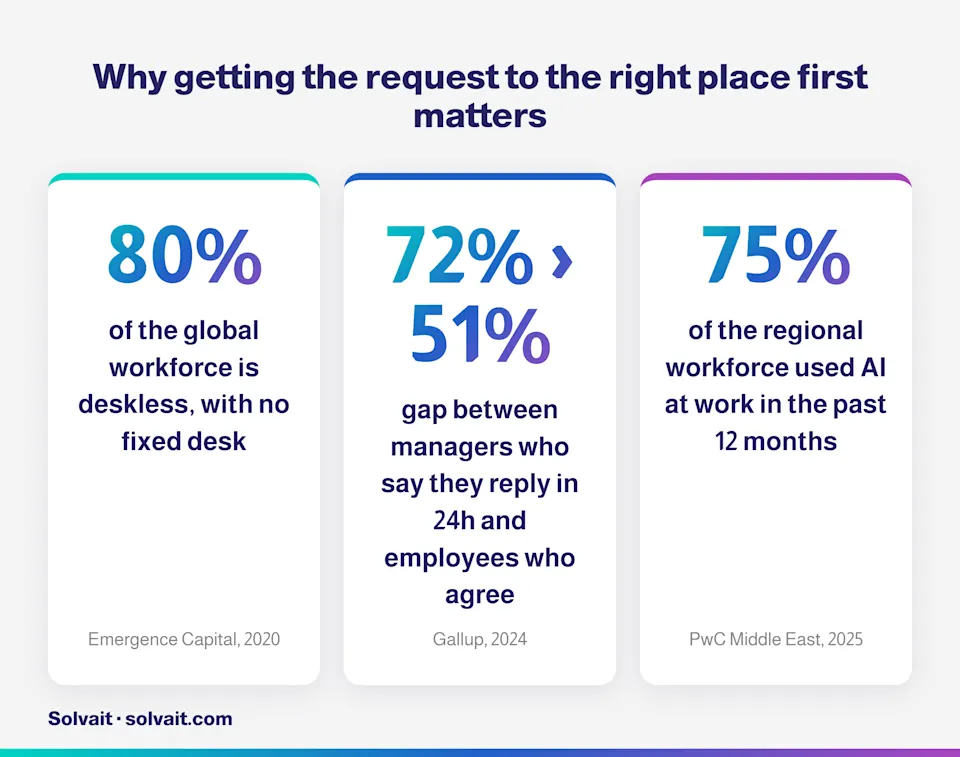
An employee at a remote site needs a day off. They message their line manager. The manager is in a meeting, then on leave, then forgets. Two days pass and the request is still pending. This isn't the rare case. It's the default. A 2024 Gallup survey found that 72% of managers say they respond to messages and calls within 24 hours, but only 51% of employees agree they do. The gap between those two numbers is exactly where requests go to die.
Manual routing fails at four repeatable points:
It reaches the wrong person. Employees don't always know who approves their type of leave, so they send it to whoever they think is in charge.
It freezes when the manager is away. With no defined backup, the request waits for one person to come back.
It doesn't escalate when it stalls. Nobody flags that a request has been sitting for two days.
It leaves no trail. A month later, nobody can say who approved what and when. That's a question an auditor will ask.
The cost isn't just annoyance. Repeated delays on simple requests are one of the fastest ways to erode an employee's trust in the system, especially for people who work away from a desk. And that's a lot of people. Emergence Capital estimated in 2020 that around 80% of the global workforce is deskless, with no fixed desk. In Saudi Arabia, 18.2 million people were employed as of Q2 2025 per GASTAT, many of them at field sites and branches, not sitting at a computer all day.
And the appetite for faster tools is already there. A 2025 PwC Middle East survey found that 75% of the regional workforce had used AI at work in the past 12 months. The employees are ready. The problem is the systems that make them wait.
How does automatic routing by reporting line work?
Automatic routing replaces guessing with a rule. Instead of the employee deciding where a request goes, the system already knows, from the org structure. It happens in five clear steps.
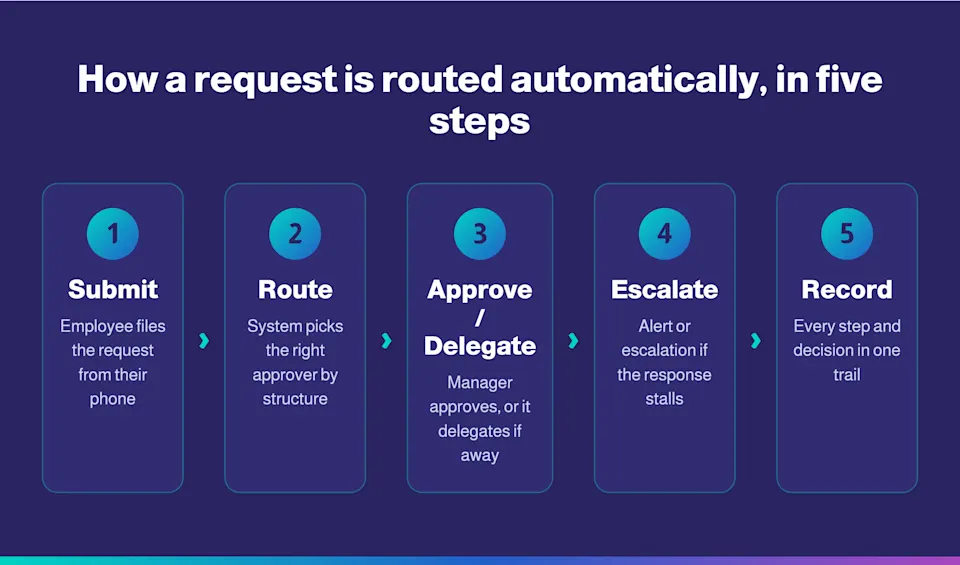
Submit: the employee files a leave or excuse request from their phone in a few taps.
Route: the system identifies the correct approver by reporting line and request type, and sends it straight there.
Approve or delegate: the manager approves or rejects. If they're away, the request moves to the defined backup automatically.
Escalate: if the response runs past the allowed window, an alert is raised or the request escalates up a level per policy.
Record: every step, comment, and decision is saved in one trail, so everyone can see who did what and when.
Step three is the heart of it. Delegation isn't a nice-to-have. It's the difference between a request that gets handled and one that waits for a manager's vacation to end. Step four, escalation, is what keeps requests from falling into a void. And step five is what makes the whole thing auditable instead of a scattered chat history.Here are the three approaches side by side:
Criterion | Paper or manual | Basic self-service | Configured auto-routing |
|---|---|---|---|
Who sets the approver? | Employee guesses | Employee picks from a list | System, by reporting line |
When the manager is away | Waits for their return | Usually waits | Delegates to backup automatically |
When a response stalls | Nothing | Usually nothing | Alert or escalation |
Decision record | Scattered or lost | Partial | Every step logged |
Channel | Email and WhatsApp | Web | Mobile and web |
The mistake everyone makes: many teams assume that just having a self-service app solves the problem. It doesn't, if routing inside it is still manual. The real value comes from an approval workflow configured to your actual structure, not from simply moving the form off paper and onto a screen.
What does this look like in practice in Everything's App?
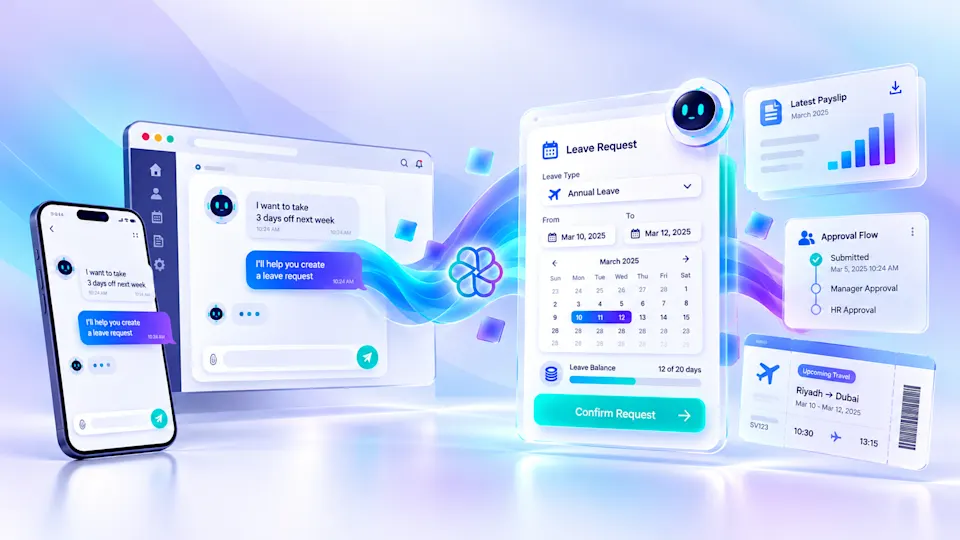
Take the case every HR lead knows: a field employee at a remote site needs emergency leave.In Solvait's Everything's App, the employee opens the app on their phone and files the leave request in a few taps. The app routes it automatically to their manager through an automated approval chain configured to your organization's policies. The manager gets the alert and approves it on the spot from their own phone, even outside the office. Then every step, comment, and decision is saved in the workflow history, so everyone can follow the full path.That solves all four problems at once. The app handles leave, excuse, and attendance requests, and lets the employee check their leave balance and request status in real time. For the manager, the important part is the ability to delegate, track, and manage the team's needs with full transparency, with an approval trail that shows every step and decision on record.
The app doesn't decide the approval for the manager. It routes the request, reminds, and records. The decision stays human. That's Solvait's stated principle: the AI does the work, your team makes the calls. Automatic routing removes the friction, not the accountability.And this is where the topic meets employee experience. When a request reaches the right place the first time and gets approved in minutes instead of days, the employee feels the system is working for them. That's what employee experience actually measures. Not slogans, but how much friction you've taken out of their day. Field workers are open to it, too: a 2022 Microsoft study found that 63% of them are excited about the opportunities technology creates in their work.
Solvait: self-service that reaches the phone
Everything's App is Solvait's mobile first employee self service app. It covers leave, excuse, and attendance requests, real time balance and report inquiries, and profile management, with automated approval chains for any request type, configured to your structure and policies. It connects to whatever HR system runs in the back, whether that's SAP or Oracle.And if you'd rather have employees run HR tasks through a conversation instead of forms, Solvait's HR Assistant actually executes: it checks balances, submits requests, and routes approvals through your system. Both are part of the wider Solvait AI HR platform that runs the full HR lifecycle under human oversight.See the effect on your field team: explore Everything's App and how it puts self service in every employee's pocket.Want to see automatic routing on your own org structure? Book a demo with Solvait.
Frequently asked questions
What are the best AI powered employee experience platforms?
The best employee experience platforms combine mobile self service, an assistant that executes tasks rather than only answering, and an AI layer under human oversight. From Solvait, Everything's App provides self service and request routing, HR Assistant executes tasks through conversation, and the Solvait AI HR platform runs the full lifecycle. The right test isn't feature count. It's how much friction the platform removes from an employee's day.
What happens to a leave request when the manager is on leave?
In a well configured routing system, the request doesn't wait for the manager to come back. Approval moves automatically to a pre-defined backup, or escalates up a level per policy. This delegation is what stops simple requests from freezing, and it's one of the main things that separates automatic routing from basic self service.
Can requests be approved from a phone outside the office?
Yes. In an app like Everything's App, the alert reaches the manager's phone and they approve or reject it directly, even from a field site or after hours. This matters especially in Saudi Arabia, where a large share of the workforce is in the field and isn't sitting at a computer all day.
What's the difference between employee self service and automatic approval routing?
Self service lets the employee submit and track a request themselves. Automatic approval routing is what happens after they submit: getting the request to the correct approver by structure, delegating when someone's away, and escalating when it stalls. Self service without smart routing just moves the problem from paper to a screen.
Does the system keep a record of who approved a request and when?
Yes, and it's one of the biggest reasons to move off manual methods. Automatic routing logs every step, comment, and decision in one trail. So when an auditor or an internal review asks who approved a given request and when, the answer is ready instead of buried in scattered messages.
References
Gallup: The Manager Squeeze: How the New Workplace Is Testing Team Leaders, 2024 (manager response-time gap: 72% vs 51%).
Microsoft: Work Trend Index: Technology Can Help Unlock a New Future for Frontline Workers, 2022 (63% of frontline workers excited about tech; technology among the top stress-reducers).
PwC Middle East: Hopes and Fears Survey 2025, 2025 (75% of the regional workforce used AI at work in the past 12 months).
GASTAT: Labour Market Statistics, Q2 2025, 2025 (18.2 million employed in Saudi Arabia).
Emergence Capital: The State of Technology for the Deskless Workforce, 2020 (around 80% of the global workforce is deskless).
Solvait: Everything's App and Solvait Agentic AI HR (self-service and approval-chain capabilities: 260+ clients, 99.9% uptime, 50% time savings, 30-day setup, ISO 27001:2022).
See agentic HR in action
Solvait AI HR and its agents prepare Saudi labor-law work so HR can review it before anything is submitted.
Tags
Related Posts
Arabic First Employee Self Service Portal Guide
How to build an Arabic first employee self service portal your staff actually use in Saudi Arabia: the 5 layers, adoption benchmarks, and where AI fits.
Sep 1, 2026

Employee Self Service App for Any HR System
An employee self service app that runs on top of SAP, Oracle or Dynamics without replacing your current system. Benefits and requests from a phone.
Sep 24, 2026
AI HR Assistant in PeopleHub: Ask Solvait AI
Ask Solvait AI is the AI HR assistant inside PeopleHub: ask in plain language, it works out the form and completes your request under your own login.
Oct 12, 2026